
Private notifications, kept on your phone
Notification Protection hides message previews from the apps you choose, so they don't pop up on your screen for others to read. App Lock keeps a private copy of those notifications on your phone, so you can still read a message after the sender deletes it.

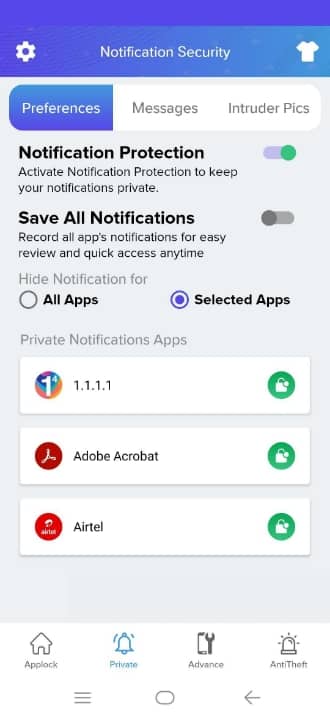
No previews over your shoulder
Notifications from locked or selected apps are removed from the notification shade and saved behind your lock.
Read it even if it was deleted
If a message arrived as a notification and the sender deletes it later, your saved copy is still there. It works with notifications from chat apps like WhatsApp, Messenger, Telegram and Instagram.
Stored only on your device
Saved notifications stay on your phone. Delete them one by one whenever you like.
How to turn it on
- Open App Lock and go to the Private tab.
- Open Preferences and turn on Notification Protection.
- Choose All Apps or Selected Apps.
- Read saved notifications in Private › Messages.
Questions
Can App Lock recover any deleted chat?
No. It can only show messages that reached your phone as a notification while Notification Protection or Chats Notifications was on. It can't recover older messages or media.
Are my messages uploaded anywhere?
No. Saved notifications are stored only on your device.
More from App Lock
Intruder selfie
App Lock silently takes a front-camera photo when someone enters the wrong PIN, pattern or knock code on a locked app. See who tried, and when.
Learn more →Fake crash screen
Fake Cover shows a convincing “has stopped working” error instead of a lock screen, so snoopers give up. Long-press OK to reveal your real lock.
Learn more →Hide the App Lock icon
Icon Camouflage swaps App Lock's launcher icon and name for a Calculator, Compass, Music or Contacts icon, so nobody knows your apps are locked.
Learn more →