
Lock apps when it matters
Set apps to lock only on certain days and hours, lock whole groups like Social or Games in one tap, and use Delay Lock so you don't unlock the same app again when you step out for a moment.

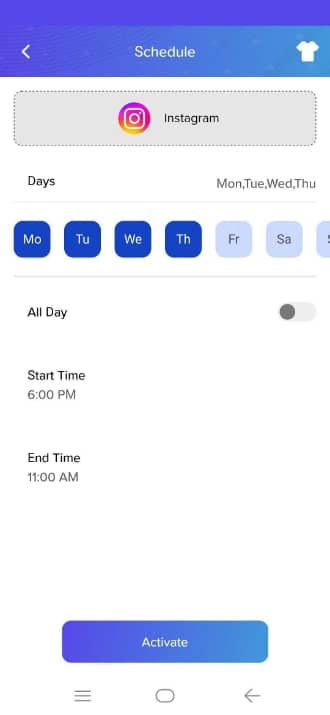
Scheduled lock
Pick the days and a start and end time, or all day, for each app. It locks only inside that window.
Groups
App Lock sorts your apps into categories automatically. Lock a whole group in one tap, or create your own.
Delay Lock and pause
Delay Lock gives you 30 seconds to come back without unlocking again. You can also pause the lock for 2 to 60 minutes after entering your code.
How to turn it on
- Open App Lock and go to the Applock tab.
- Open Schedule and tap add.
- Choose the app, the days and the time window.
- Turn on Delay Lock in the Advance tab if you want the 30-second grace.
Questions
Can I lock apps only at night?
Yes. Create a schedule with a start and end time, and the app locks only between those times.
What's the difference between a group and a schedule?
A group locks several apps together. A schedule controls when an app is locked.
More from App Lock
Intruder selfie
App Lock silently takes a front-camera photo when someone enters the wrong PIN, pattern or knock code on a locked app. See who tried, and when.
Learn more →Fake crash screen
Fake Cover shows a convincing “has stopped working” error instead of a lock screen, so snoopers give up. Long-press OK to reveal your real lock.
Learn more →Hide the App Lock icon
Icon Camouflage swaps App Lock's launcher icon and name for a Calculator, Compass, Music or Contacts icon, so nobody knows your apps are locked.
Learn more →