
See who tried to open your apps
When someone enters the wrong PIN, pattern or knock code on a locked app, App Lock quietly takes a photo with the front camera. You find it later in Intruder Pics, with the time and the app they tried to open.

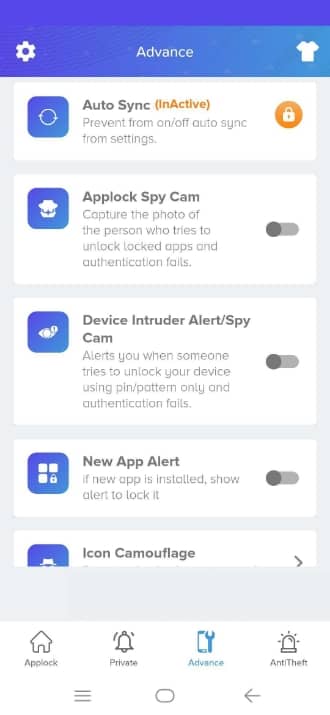
Silent capture on a wrong attempt
No shutter sound and no preview. The person at your phone just sees the lock screen.
A dated record
Each photo shows when it was taken and which app they tried to open, so you know exactly what happened.
Your photos, your choice
Intruder Pics live on your phone, and you can delete any photo. If you sign in with Google, recent photos also sync to your AppLock Web account.
How to turn it on
- Open App Lock and go to the Advance tab.
- Turn on Applock Spy Cam and allow camera access.
- Lock the apps you want to protect.
- Check Private › Intruder Pics to see any captures.
Questions
Does the person know a photo was taken?
No. The capture is silent and the lock screen doesn't change.
Where are intruder photos stored?
On your phone, in the Intruder Pics section of the app. If you sign in with Google, your recent photos also sync to your AppLock Web account so you can see them from a browser.
Can I use this to photograph other people's phones?
No. Intruder selfie protects your own phone and apps. Only install and use it on a device you own.
More from App Lock
Fake crash screen
Fake Cover shows a convincing “has stopped working” error instead of a lock screen, so snoopers give up. Long-press OK to reveal your real lock.
Learn more →Hide the App Lock icon
Icon Camouflage swaps App Lock's launcher icon and name for a Calculator, Compass, Music or Contacts icon, so nobody knows your apps are locked.
Learn more →Notification privacy
Hide message previews from locked apps and keep a private, on-device copy of notifications you receive, even after the sender deletes the message.
Learn more →